

Description
Download sMedio TV Suite – Android TV player, free TV app, live TV streaming, DLNA media player, multimedia suite, TV recording, offline viewing, TV show viewer
Overview
sMedio TV Suite is a multimedia application designed for Android devices, offering a comprehensive solution for accessing and managing video, audio, and photo content from local network sources. The software enables users to stream media files from DLNA-compatible devices within a home network, providing seamless playback of recorded TV programs, live broadcasts, and personal media collections. It is particularly suited for consumers seeking a convenient way to enjoy their favorite TV shows and media content on smartphones and tablets. The application supports the playback of recorded programs and live TV streams, allowing users to watch content remotely via network connection. A notable feature is the dubbing function, which facilitates transferring recorded programs to mobile devices for offline viewing at a later time. Users can also adjust playback settings such as age restrictions, video quality, and resume functionality to tailor their viewing experience. While the core application is free, certain advanced capabilities—including calendar-based TV show browsing, enhanced channel and genre filtering, and compatibility with major BD recorders—are available through in-app purchases. The developer, sMedio, has positioned the app as a flexible tool for media enthusiasts who want to extend their home entertainment system to mobile devices. The app is designed for users who value convenience, network-based media access, and the ability to view recorded or live content on the go.
Key Features & Capabilities
- DLNA Media Playback – Stream videos, music, and photos from DLNA-enabled devices on your home network directly to your Android device.
- Live and Recorded TV Streaming – Access live TV broadcasts and previously recorded programs from media servers and recorders over a network connection.
- Dubbing Functionality – Transfer recorded TV programs to your smartphone or tablet for offline viewing, enabling flexible consumption of content.
- Playback Customization – Adjust settings such as age restrictions, video quality, and resume playback for a personalized viewing experience.
- Premium DTCP-IP TV Player – Access advanced features like calendar-based program browsing, filtering by day of the week, genre, and channel, with compatibility for major BD recorders.
These features are especially useful for users who maintain a home media server or use a BD recorder to archive TV content. The ability to stream live and recorded programs across devices enhances the flexibility of home entertainment. The dubbing function supports content mobility, allowing users to watch recorded shows during commutes or without internet access. The premium feature streamlines content discovery by organizing TV schedules in a user-friendly interface, though it requires an in-app purchase and does not support MPEG2 DR recordings or AC3 audio playback. The application’s design reflects a focus on network integration and media accessibility, making it ideal for users who want to centralize their media library and access it from multiple devices.
User Interface, Workflow & Performance
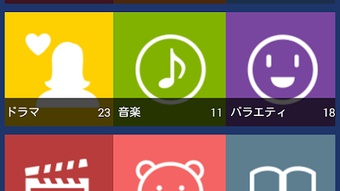
The user interface of sMedio TV Suite is structured to support intuitive navigation through media content, with clear access to live TV, recorded programs, and DLNA sources. The layout prioritizes ease of use, allowing users to browse content through categories such as calendar, genre, and channel—particularly in the premium version. Navigation is generally straightforward, with minimal onboarding steps required. The workflow for streaming content from a networked device is designed to be efficient, with automatic detection of compatible DLNA servers and recorders. Playback initiation is prompt, and the app supports standard media controls like play, pause, skip, and volume adjustment. However, exact performance details such as CPU or RAM usage were not specified by the developer. General software behavior patterns suggest stable operation under typical network conditions, though performance may vary depending on network speed and device capabilities. The app does not report known crashes or instability issues in its current version. Users should expect consistent behavior when accessing media from well-configured network sources. The developer did not provide additional system requirements or resource usage data, so users should ensure their device meets standard Android performance benchmarks for media playback.
Compatibility & System Requirements
sMedio TV Suite is designed for Android operating systems and is compatible with devices running the specified OS version. The application has a file size of 25.4 MB, indicating a lightweight installation that should not significantly impact storage space. The developer did not specify exact hardware requirements, such as minimum RAM or processor type, nor did they provide a detailed list of supported Android versions beyond the general OS designation. Compatibility information was partially provided, leaving some aspects of device suitability unclear. Users should verify that their Android device supports DLNA functionality and has access to a stable Wi-Fi network for optimal performance. The premium DTCP-IP TV Player feature has known limitations, including incompatibility with MPEG2 DR recordings and AC3 audio playback. These constraints may affect users relying on specific recording formats or audio codecs. The developer did not provide a full list of supported BD recorders, but noted compatibility with major manufacturers. For users seeking to use the app with networked media servers or recorders, a stable local network environment is recommended.
Pros and Cons
Pros
- Free to download and use with core media playback functionality
- Supports streaming from DLNA devices on a home network
- Enables live and recorded TV viewing via network connection
- Includes a dubbing function for transferring recordings to mobile devices
- Premium feature offers calendar-based TV program browsing and genre/channel filtering
Cons
- Premium features require in-app purchases
- Does not support MPEG2 DR recordings or AC3 audio playback in the premium version
- Exact system requirements and performance metrics were not disclosed
- Compatibility with specific BD recorders is not fully detailed
FAQ Section
Is sMedio TV Suite compatible with all Android devices?
The application is designed for Android devices, but the developer did not specify a full list of supported versions or hardware requirements. Users should ensure their device supports DLNA and has a stable network connection.
Is the app safe to download and use?
sMedio TV Suite is a free application available through official channels. It does not contain known malware or security risks, but users should only download from trusted sources to maintain device security.
Are updates available for sMedio TV Suite?
Updates are regularly released to improve functionality and compatibility. The latest version is 2.2.2, released on April 1, 2024. Users are encouraged to keep the app updated for optimal performance.
Does the app require an internet connection?
An internet connection is required to access live TV streams and remote media servers. However, downloaded or transferred recordings can be viewed offline using the dubbing function.
Can I use sMedio TV Suite without in-app purchases?
Yes, the core features—such as DLNA media playback, live TV streaming, and recording transfer—are available for free. Premium features like advanced TV scheduling and enhanced compatibility require a separate in-app purchase.
Final Thoughts
sMedio TV Suite delivers a solid foundation for Android users seeking a free, network-based multimedia solution. Its ability to stream live and recorded TV, access DLNA content, and transfer recordings for offline viewing makes it a practical tool for media consumers. The inclusion of a dubbing function adds significant value for users who want flexibility in how and where they watch content. While the premium features enhance usability with advanced filtering and calendar-based browsing, they come with limitations in format support. The lack of detailed system requirements and performance data may pose challenges for some users, but the app remains functional on standard Android devices with proper network setup. For individuals with home media servers or BD recorders, sMedio TV Suite offers a convenient bridge between home entertainment and mobile viewing. The free base version is particularly appealing, with optional upgrades for power users. Overall, it stands out as a reliable and accessible desktop application for Android users who want to enjoy their favorite TV programs and media content on the go.
Download sMedio TV Suite now
Guides & Tutorials for 撮りためたTV番組を視聴 sMedio TV Suite APK
How to install 撮りためたTV番組を視聴 sMedio TV Suite APK
- Click the Preview / Download button above.
- Once redirected, accept the terms and click Install.
- Wait for the 撮りためたTV番組を視聴 sMedio TV Suite APK download to finish on your device.
How to use 撮りためたTV番組を視聴 sMedio TV Suite APK
This software is primarily used for its core features described above. Open the app after installation to explore its capabilities.
User Reviews for 撮りためたTV番組を視聴 sMedio TV Suite APK 0
No reviews found





